How it works
From sectional chart to live weather
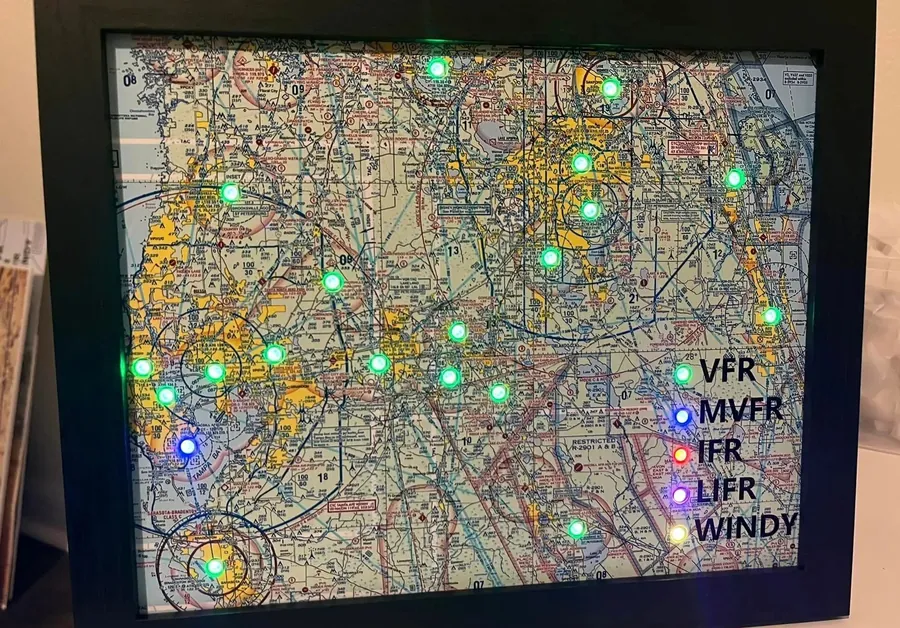
Always know the weather at your favorite airports. A small hub on your WiFi downloads the current weather and lights each airport on your map by its flight category.
- 1
Pick your airports
Choose the area you fly and the airports you want lit.
- 2
We make your map file
Map file creation is free with every kit. Kits with a printed map include a proof by email before we print.
- 3
Plug in and join your WiFi
The hub opens its own setup network. Pick your WiFi from the list and enter your airports.
- 4
Watch the weather
Each light shows its airport's flight category and updates on its own, about every 15 minutes.
The colors
What each light tells you
- Green VFR
- Blue Marginal VFR
- Red IFR
- Magenta Low IFR
- Flashing yellow High winds (you set the limit)
- White flicker Lightning
Icing breathes toward blue, and each airport can dim at its own local sunset. Every effect can be turned off in setup. More about the lights.
What is in the kit
Three parts, ready to go
Hub
The brains of the kit. It connects your map to the internet over WiFi and downloads the current weather. You adjust the settings and enter your airports on its setup page.
LED lights
Rated for thousands of hours of continuous use. The hub controls each light individually, and brightness is adjustable.
Wall plug
Attach it to your map, plug it in and connect to WiFi. Including the power adapter makes sure your map gets the right power for years of use.
Kits come pre-programmed. Add your own frame and map, or choose a kit with a printed map and frame. Build your map.
No subscription
Free weather for the life of your map
There are no annual fees and no subscriptions. Your map gets its weather free, for as long as you own it. Major new firmware versions, like 6.1, are an optional one-time upgrade for older maps. Firmware updates.
Full DIY, self assemble, or fully assembled
You decide
Build every part yourself, assemble a kit with a printed map and frame, or have it fully assembled: unpack it, plug it in, join your WiFi. Checkout ships to Canada, Europe, Australia, Japan and other countries, and to the rest by quote; ask for one.
Let's build one together
Read the full build write-up on AeroSavvy.